Republicans, Inspections, Democrats, Deming

W. Edwards Deming, widely regarded as having had more impact upon Japanese manufacturing and business than any other individual not of Japanese heritage, is famous for saying you can’t inspect quality into a product. The US government shutdown is one more example of how dangerous relying on inspections can be.

Some of you may be intimately familiar with the US government shutdown. Essentially, Congress failed to pass a spending bill and the government has stopped providing services that are not considered “essential.”

Without getting too political (for example, I won’t mention that Congress and the president are exempt from the furlough and continue to get paid), I wanted to report on a few impacts of the shutdown from a quality-related and inspection perspective.

For example, according to Reuters, the U.S. government shutdown is blocking Boeing and Airbus from delivering aircraft to U.S. airlines and raising safety concerns, even though hundreds of furloughed workers have been recalled (it could have been, and was for a short time, worse).

It’s a question of having government workers available to certify components, and finalize delivery of completed aircraft. It is uncertain when these certification and inspection procedures will operate normally.

Unsettling.

The closure of one Registry office in Oklahoma City, similar to a DMV but for aircraft, has stymied almost 1.5 billion US dollars in private plane deliveries. Not quite Quality-related, but certainly one that may lead to shortcuts being taken in established procedures once the floodgates do re-open – and that is yet another Quality concern with consequences.

Besides aircraft, there’s the air traffic control system itself. Radar, buildings and other equipment need frequent inspections. Many of these are not considered critical – and are not being done. Over time, these could build upon themselves.

And the quality challenge isn’t just limited to machines, an article in “Medical Daily” reports that FDA Food Safety Inspections have been suspended. The government has furloughed 60% of the Inspectors.

Caroline Smith DeWaal, director of food safety at the Center for Science in the Public Interest says, “For every day the government is shut down, it’s going to take them many weeks to make up the work that’s not being done. When they come back to work there’ll be a backlog of plants that should have been visited during this period that aren’t being visited. Our inspection system is already pretty anemic, and now it’s not even moving, now it’s totally dysfunctional.”

Safe food to our tables, with the existing process, relies on these inspections – they aren’t happening. And when they do begin again, what are the chances they’ll be done with the same [already suspect] care they had before the shutdown?

I’m not saying doing away with all inspection is possible, or even practical – but the need for inspection is a symptom of an imperfect system. Processes that have embedded controls, for example, or utilize mistake proofing (poka yoke) techniques have a proven track record of higher reliability and are less expensive to operate.

We might learn from what is being reported as our government inspection and certification processes fail with the removal of adequate resources. One lesson is clear: reliance on inspection, often one of the last steps in a process, creates a bottleneck in production, and likely long-term reliability issues once the process is restarted.

Do Mr. Deming proud, and consider where you have inspection steps in your processes, and see what you can do to eliminate them, without sacrificing quality.

Do that, go forth – and calibrate thyself.

Sal
 

Sunday Summary

Here’s a look at the week gone by.

This week’s “Toolsday” brought us a tutorial on how to create a Pareto chart using Excel 2013, which may be helpful to some of you. You’ll find how to create one in other versions of Excel with a little Google-fu, but ours may be the only currently available for the latest version.

That was the extent of the formal posts this week, excepting tweets and Facebook updates. A large part of my week was occupied with a reCertification audit. This is, by the way, what happens after two yearly “surveillance audits” – you may remember we covered the audit cycle in an earlier post.

This company was actually very good – one of the better implementations I’ve seen as a point of fact. Thought I would spend a few moments listing a few bullet points on why this is so.

  • First, it’s a long-time implementation; they started their journey, albeit in a slightly different structural form, in the mid-nineties. That would have been the 1994 version of the standard. So, in a word, Experience.
  • Secondly, they have strong quality system leadership; a competent and vocal Management Representative who enjoys the technical and practical respect of those around him. Call that, summarily, Stewardship. This differs slightly from leadership, which some may call this and they would be still correct, if imprecise – in that a steward also helps operate the machine and knows how it works. It is vitally important that the leadership support the system, and that is truly a component of Stewardship and something at which this particular company also excels.
  • Thirdly, there is little difference between how seriously the formal management system is taken at the different levels of the organization. Soldier and general alike reference and follow the established processes and are actively concerned with improving them. Let’s call this Cultural Integration.

Most companies have some or all of these, and other nice-to-have’s, to varying degrees – but these folks are rock solid, “Best in Show” in each of these three. So, three keys to a successful, world class formal management system implementation: Experience, Stewardship, and Cultural Integration.

Would like also to make mention of another activity from the week, a meeting of the Granite State Quality Council. I’m planning on a dedicated post about the Council, but this event made recognition of two outstanding New Hampshire organizations.

There were presentations on these organizations’ best practices and lessons learned to help audience members improve their own organizations. Part of the night was devoted to recognizing the dedicated Examiners and Judges who participated in the program. It was my first experience with the Granite State Quality Council and I do hope to become more involved.

Looking forward to three audits next week: California, Massachusetts and good ol’ New Hampshire.

And I do hope you have a fulfilling week as well. Get some rest.

Sal


Pareto Chart in Excel 2013 – How To’sday!

a Pareto Chart in Excel 2013 isn’t a simple press of a button, as one might think. It isn’t terribly difficult, but there is some arrangement of the data needed before the charting can begin. This step-by-step guide will help you through it.

Step One : Defect Code Identification

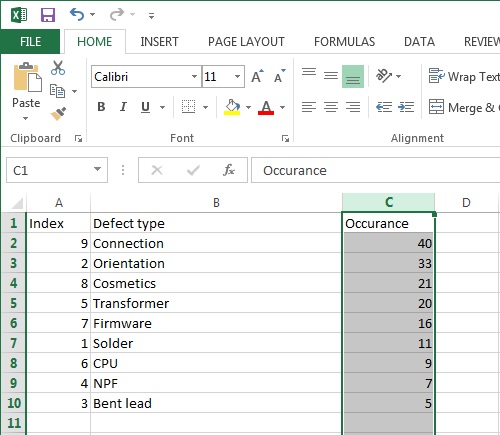
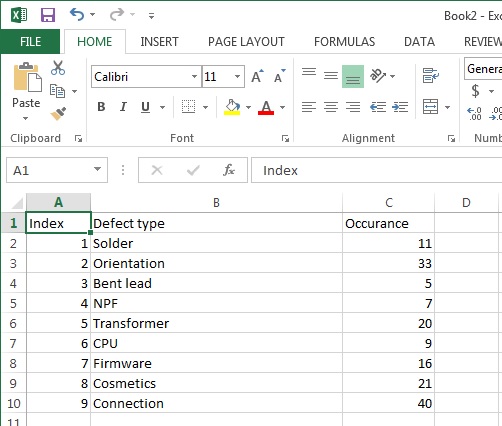
You’ll need three columns for now, one as a counter, one with your defect codes and one for the number of occurrences of each type of defect. Like so:

step 1

The counter, by the way, is totally optional – I’m using it here to help make some of the sorting clear. Feel free to leave it out if you understand the nuances of sorting columns in Excel.

Step Two – Order by Occurrence; Descending

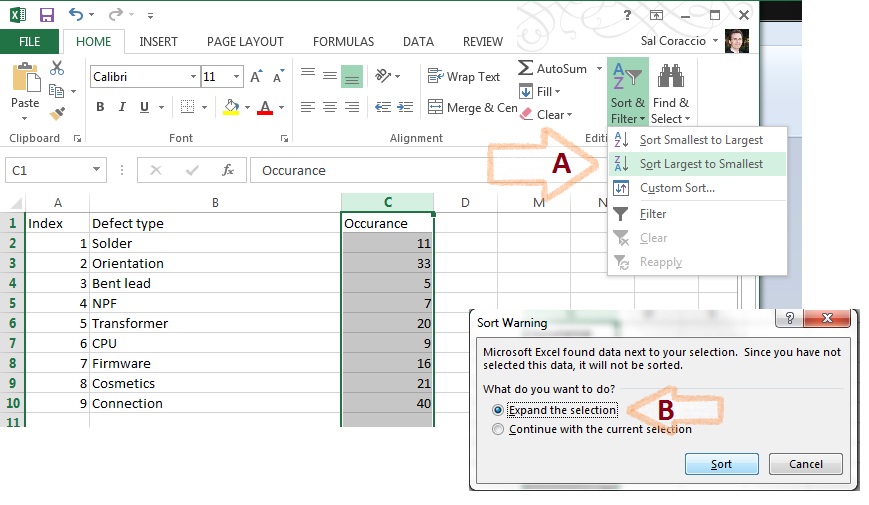
Arrange the defect codes in descending order of numerical Occurrence – Column C in our case.

step 2a

Be sure to select all columns prior to the actual sort, when asked (as above).  Now our chart looks like this. The “Index” column should be all out of sorts, now:

step 2b

Step Three – Add a column for cumulative occurrence

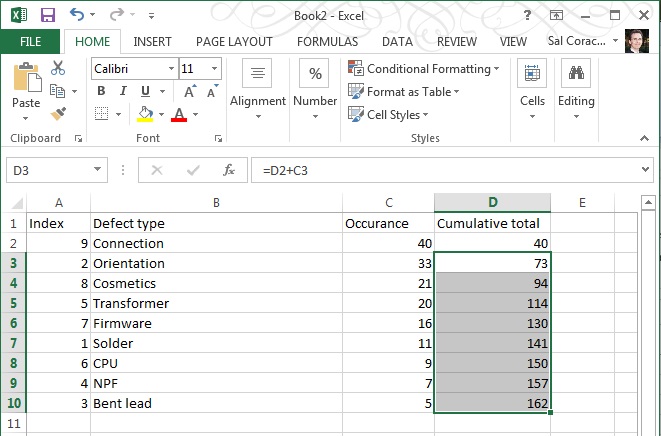
Basically a formula to add the cell to the one above it, getting larger all down the column – like in the capture below:

step 3a

Hit ENTER, then – to duplicate the formula for the cells below it, grab the corner of cell D3 and drag the box to the corner of cell D10, as shown:

step 3b

Your numbers should look like the image below, if it doesn’t then check your formulae.

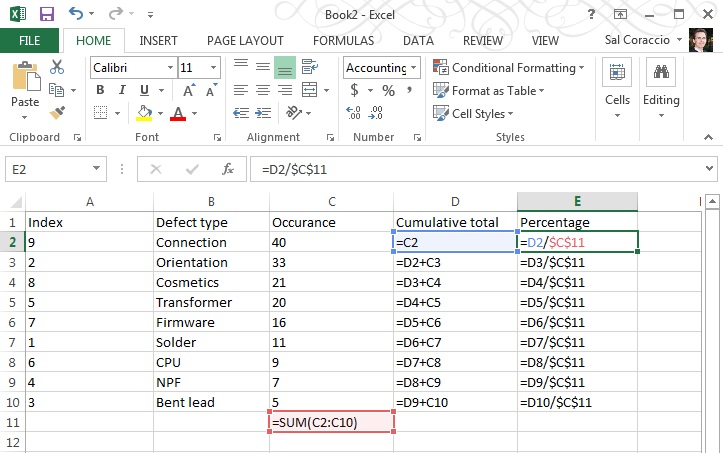
  • D2 should be “=C2” [no quotes please!]
  • D3 should be “=D2+C3”
  • D4 s/b “=D3+C4”
  • D5 s/b “=D4+C5”
  • D6 s/b “=D5+C6”
  • D7 s/b “=D6+C7”
  • D8 s/b “=D7+C8”
  • D9 s/b “=D8+C9”
  • D10 s/b “=D9+C10

step 3c

Step Four – Calculate Totals, add Percentage

Calculate total of numbers shown in the Occurrence column and add a column for Percentage.

First, add a sum to column C; Occurrence

step 4a

Then add a formula to column E that uses the total you just made as shown below:

step 4b

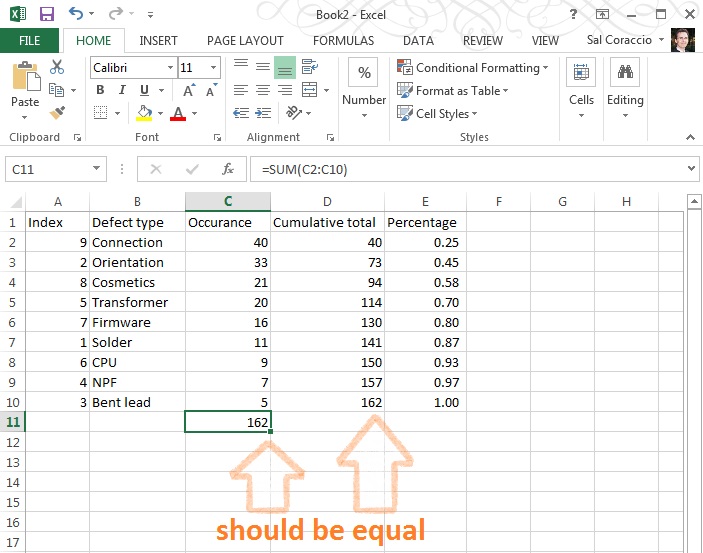
Make sure your totals match (D10 should be the same as C11)

step 4c

Go ahead and format that Percentage column to be a percentage with two decimal places, like so:

step 4d

NOW – The numbers should appear as below (if you’re using this example as a first run – which is not a bad idea, right?)

ready to graph

We’re ready to make a proper Pareto Chart

Step Five- Select Columns

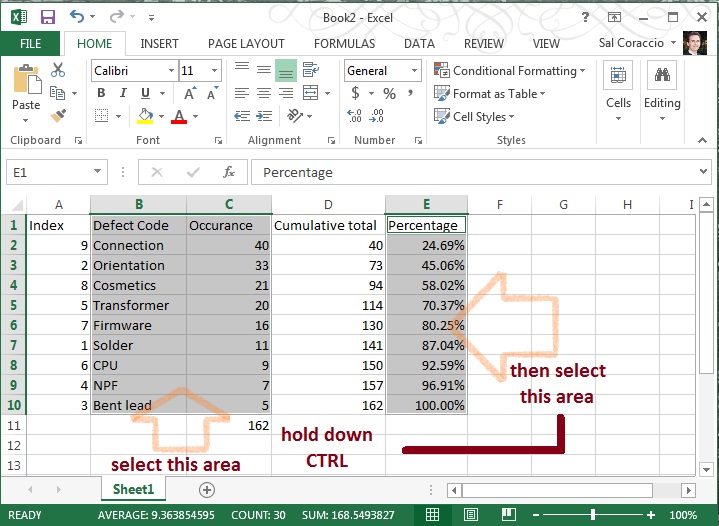
This may be a little tricky, so follow closely. First, using the mouse, select B1 to C10 (two columns), THEN – Without Clicking Anywhere Else – hold down the CTRL key AND using the mouse, click E1 to E10… You should have two selected areas now that look like this:

step 5a

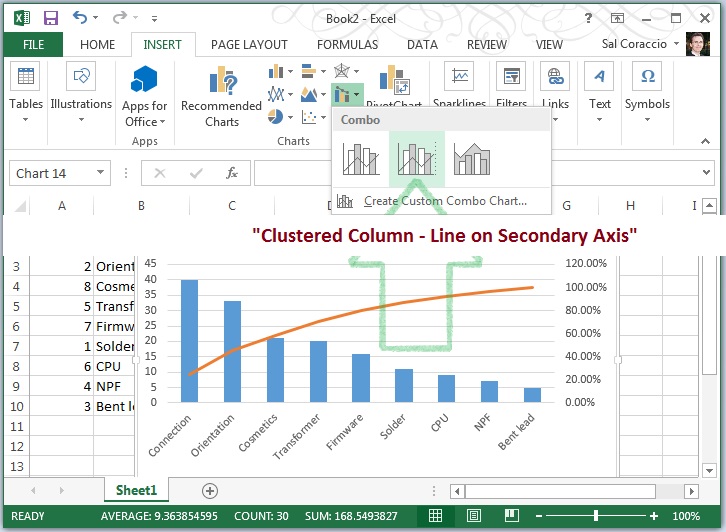
With those areas still selected click “Insert” / “Insert Combo Chart” then the centered chart type pictured – it is called “Clustered Column – Line on Secondary Axis”. Navigate to it as pictured below:

step 5b

Wow. We’re almost done – should look something like this:

step 5c

Step Six – Clean Up

We need to adjust that axis on the right and add a title, and whatever else you’d like to do to pretty this up.

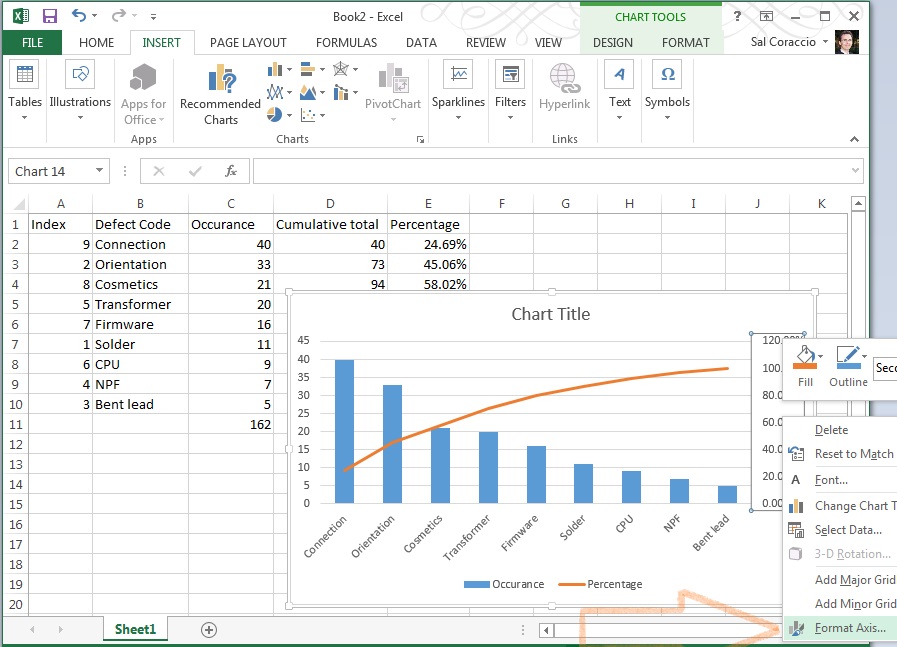
To change the axis, right click in the body of that section of the chart and select “Format Axis”,

step 6a

 then change the number (1.2 in this example) to 1.0:

step 6b

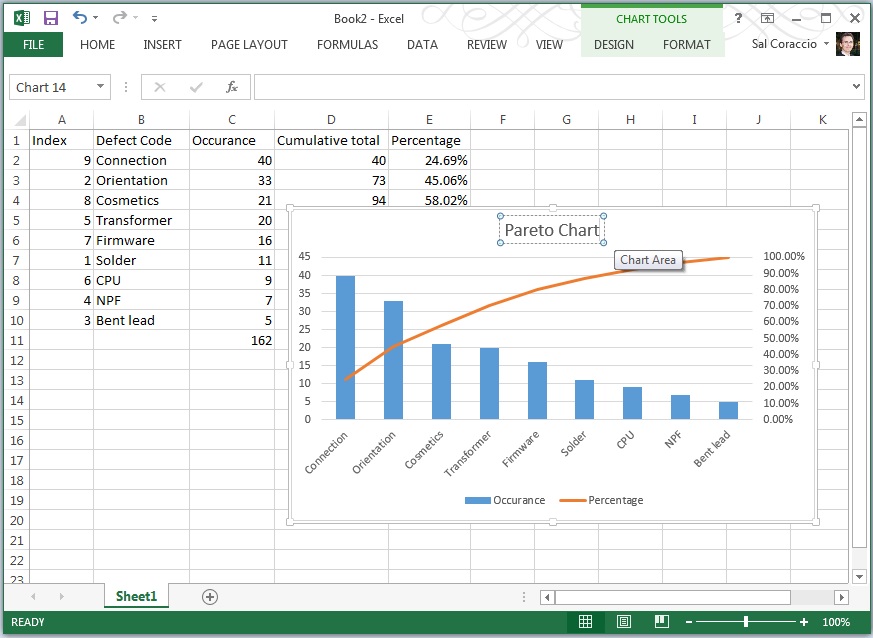
Et Voilà! You’re done! Once you’ve done a few it actually becomes quite easy. We ended up with something like this here:

finished

Now you’re ready to incorporate it into your next management meeting, and use it to get the resources you need to fix the vital few, leaving the trivial many for another day.

To review the concept and uses behind the Pareto Chart tool, we covered that in last week’s Toolsday.

Thanks for following along, and if you’ve got any strength left, go forth – and calibrate thyself.

Sal
P.S. I hope you’ve found this post helpful, can I ask you to look at this offer? I’ve used Audible for over 10 years – it really is a wonderful resource.


Thank you.