We’re starting at the top of the portable gadget food chain with tablet computers. Mostly, we’ll be covering convertible ultrabook tablets.
I’m away enough on the road that any little problem is worth solving – inefficiencies and lost opportunities add up. And when something works – or doesn’t work – I’m more than happy to pass it on.
This is the first in a series of Auditor Gadgets – feel free to pipe in a suggestion or two and I’ll check it out!
Why a Tablet?
Using a tablet means not a single sheet of paper is sullied. Everything I need, whether I write on it, or a customer does – is written directly onto the tablet with a Digitizer Pen.
Back in the day, when I wasn’t knapping obsidian arrowheads, I printed everything on paper (we called it “papyrus”). All the myriad forms and each page of each checklist needed printing, then each sheaf had to be laboriously carried – uphill – to the job site. Then we’d gather signatures or otherwise draw (using various pigments) onto the paper. Then the scanning would begin – and never seem to end.
IT’S SO MUCH EASIER NOW. I just create the documents, complete them in digital ink right on the screen – and print to pdf. DONE.
I’ve had my particular tablet for a bit over a year, and while I still really love it – if I had to replace it today, I might choose something else… I’ll share my reasoning.
The Contenders
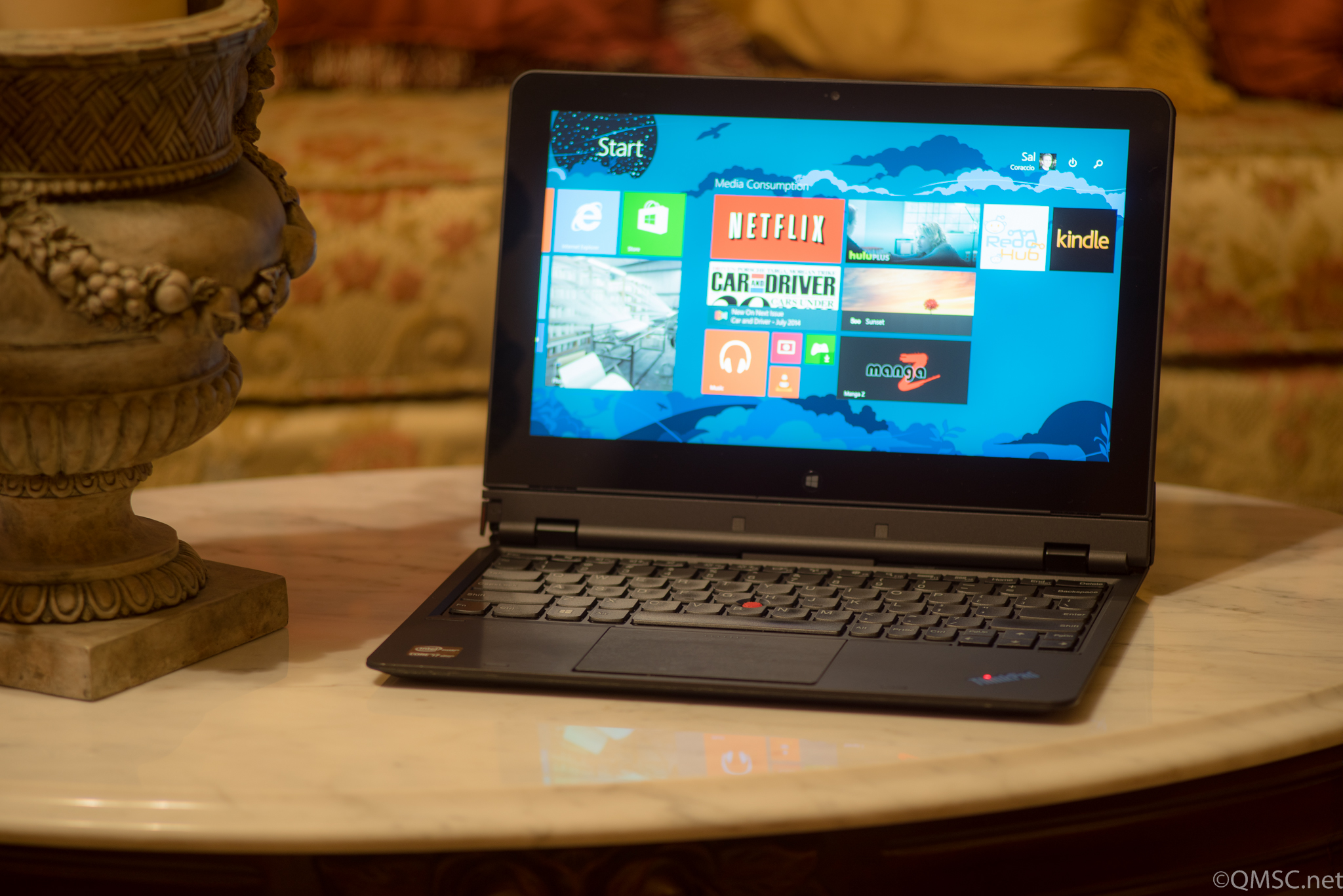
Lenovo ThinkPad Helix Convertible Tablet

First up for your consideration is the Lenovo Thinkpad Helix. Mine is configured as an i7 – they can be had as a slightly less powerful i5 (which most will find completely awesome), and the less expensive i3 is fine if you’re on a budget.
Storage and memory have various combinations as well. I’ve installed 12 gigs of RAM and there’s a 180GB Solid State Drive (SSD). Things run speedily and fairly quietly – occasionally the fans do kick in and the decibels creep up.
The coolest thing about this Windows 8 machine is it is also a tablet with a Digitizer Pen. The screen pops off and I can write on it just like papyrus! For my QMS work it is about as perfect a solution as possible.
What it means is that I can be on a manufacturing floor writing my audit notes; using checklists, referencing standards, taking images of evidence (when allowed), and searching for pertinent information on the internet.
The screen can also be attached facing away from the keyboard. That keyboard houses another battery, by the way, giving the whole rig about 8 hours total.
While I think the intent of that screen flip-ability was that it would be handy for a presentation to a small audience, I find it useful for watching movies on aeroplanes. Because the screen is on the near side of the traytable, it solves the problem of when the person in the row in front of you slams the seat back… I still really hate that person (don’t be that person!)
Other Tablet Options
Lenovo ThinkPad Yoga Tablet
While I do love the Helix, there is now the Lenovo ThinkPad S1 Yoga
At first there was only the “regular” Yoga – it had touch, but it didn’t use a Digitizer Pen. This version, recently released – does. And it’s hugely important that whatever you get uses a Digitizer Pen – did I mention that? “Touch” does not equal “Digitizer Pen” – the pen has to come with whatever tablet you choose.

Battery life is about the same at 7-hours. And it’s a bit cheaper; couple hundred bucks cheaper, actually (don’t ask me what I paid for my Helix when it was new – the week it came out).
Downsides? It’s going to be slightly heavier – but 3.5 pounds isn’t terrible (the Helix is also 3.5 pounds, but it splits in two).
The Microsoft Surface(s)
So, there are now three MS Surfaces that will work quite well; the Surface 2


The price on the Surface 2 (not the Pro 2 or Pro 3) is well under $1,000 USD though it is running the lesser version of Windows. The Surface Pro 2 is pricier but also more capable for this task.


12 inch screen, 8GB RAM, 256GB SSD and a fast processor. And it’s light, under two pounds.
If you do go looking for a Surface , be aware that they don’t normally come with a keyboard/cover
The Surfaces are built like tanks and definitely have the horsepower. I personally find the screens of all but the Surface Pro 3 a bit small at just under 10 inches. This can be mostly compensated for, however, by adjusting the display settings.
Sony VAIO SVD13223CXB Slider Tablet
The jauntily-named Sony VAIO SVD13223CXB 13.3-Inch Convertible 2 in 1 Touchscreen Ultrabook

A good-sized screen at a shade over 13 inches, though it is an i5 with somewhat lesser specs overall. I still like it and it will most likely do the job with very capable style as most Sony things do.
The price reflects the configuration, but it really isn’t that much less than the Yoga. It’s a bit on the heavy side, too, at 5 pounds. I wouldn’t get too hung up on even that weight as it cradles comfortably along the forearm.
It could be a great choice if you really love Sony gear (I kinda do since I have significantly more money invested in Sony-labeled things than in anything else).
ASUS Vivo Tab Note 8 Tablet
I thought I’d put this one out there – it’s a bit of a curve-ball. This ASUS Vivo Tab

Does it run Windows? Yes. Does it use a Digitizer Pen? Yep. Will it be a good tool for the Registrar Auditor? Eh, probably?
Is it as cool as Luke’s mechanical hand and do I want one anyway? Definitely yes (but i’m not giving up my Nexus 7 Tablet).
What Else?
A few of you may be asking, “What about an iPad?”
- No real digitizer pen – showstopper
- While it does touch, and has a pointer, it lacks resolution for small writing (yes, I’ve seen it do large pretty signatures in restaurants).
- No easy way to collect notes – Microsoft OneNote on a Windows tablet is perfect for this. Yes – there is a OneNote IOS App but it is crippled. “But there’s this cool note-taking app that works with a finger or this nifty pointer!” – No. It forces you to make bite-sized snippets of notes that have to be resized and task-switched and meanwhile you wake up and you’ve grown a long beard and everyone you know has moved on. A long beard made of papyrus.
The iPad is a nice, sexy device – I want one just to look at it and hold it… BUT IT CAN’T DO THIS TASK.
Let me be clear, I have colleagues that love them some iPad, because it does so many things so well – and they are gadget freaks too – but even they can’t make the thing do what it needs to do.
The main problem isn’t the pen/pointer, or the lack of one – it’s a limitation of the screen. Hard to work around that.
Maybe someone could ease the pain with software; a nice app that bypasses the need for detailed writing. A logical collection of related standard selections. But why?? It just isn’t worth the trouble.
Note-taking on a Windows tablet with OneNote – it just works.
Keep your iPad for everything else if you’re a fan, but get a Windows-based tablet with a Digitizer Pen for doing audits.
QMSC’s Top Pick
Because of the flexible form factor and no-compromise workability I have to go with the Lenovo ThinkPad Helix
It looks perfect on paper and since I’ve used it for over a year I know firsthand how rugged and powerful it is.
The Yoga is probably my second choice, but I’d like to see what the Surface Pro 3’s are all about (I’m a bit afraid they will be the best solution out there but be too pricey for it).
And, I’m kind of feeling like there’s room in my world for an 8 inch Windows Tablet like the Asus Vivo. Nokia makes a similar machine (Nokia Lumia 2520
There you go – the Helix plus a few other good options for an Auditor-friendly tablet computer that will make the Gadget Geek inside you say, “Thank you, kind sir, that was a reasonable list of solutions that I find technically and aesthetically satisfying.” (Gadget Geek is kind of nerdy sometimes).
Do you have a gadget you’re in love with? Post it and share the wealth! There’s always room for more stuff!
Thanks again – and if you do decide to buy something I’ve reviewed here, please do use the links supplied as it will help the site stay around.