Category Archives: Auditing

Imitation Game – Faking 9001

Faking 9001
Highest Form of Flattery

Faking 9001 or, “How to Fake a Management System”.

Yes, you read that right. I could say,”How to fool an ISO auditor”, or “How to pretend to have a management system” – but I think you get the idea.

I strive to disambiguate. I should also strive to speak more plainly. To you I present an introduction to my latest book. It is a work of comedic fiction (a flavor of fiction perpetuated solely in my own mind).

Ostensibly, it is a “How To” book. I’ve considered and rejected several titles with numbers. People like that kind of thing and I’ll put in more naming effort once I know what kinds of numbers are involved. Maybe, “9001 Ways to Fake It”.

I hope it isn’t more than seven.

In the real world, things happen; cogs turn and pistons pist. An auditor steps into the world for a day or three. She never sees the real world – she sees the manifestation of history in the forms of records, documents, an array of physical objects and people, and through discussion.

All of this is interpreted through a human brain riddled with genetic propensities toward cognitive bias. And a desire to get home.

Faking it well is helped by a solid understanding of the audit process.  That, and only slightly more than a vague familiarity with the standard.

Records

Quality records are the means by which an auditor sees much of the system. We put an inordinate amount of credibility in them, most of us.

So, there’s a minimum set we expect to see. The standard refers to them clearly.

From them we deduce the  existence of things in the past. Who knows if they’ve actually taken place.

  • Management Reviews
  • Internal Audits
  • Corrective Actions
  • Preventive Actions
  • Nonconforming material slips
  • Letters from customers; quotations
  • Purchase orders

There are more, the book has them. Actual management systems have them. Fake ones have them too.

But, a record is not an actual event. It is toner on paper. Or it consists of electrons bouncing on a liquid crystal display – all as real as crystal meth dreams behind blinking eyes.

Documents

Process and product documents sufficient to satisfy the sample size. Keep it simple; a few customers, a few simple designs.

Process documentation

A quality manual, six basic procedures, maybe a few more “tier twos” to make it look good. A work instruction or three.

Product documentation

Some drawings, product specifications, customer specifications. Cosmetic criteria…

Metrics

The coup de grâce. Charts, baby – charts. Bar charts, Pareto Charts and, the real killers – control charts.

See the previous posts about metrics – Customer satisfaction is vital. Get that – well, make that.

It’s got pretty colors and goal lines, right? Must be true. Don’t forget the goal lines.

Packaging it all

Binders – lots of binders. And logs, your going to need logs. And a few file folders. Just a few.

The idea is to provide easy access to the information in an organized appearing way. They are to be delivered to the auditor in a conference room. Stacks of binders.

Keep that person in the conference room for as long as possible. Time is your friend – use it up. Make sure there is a fridge in there, and snacks.

Maybe a nice mini-bar.

Records binder – this is where you’re going to assemble your management reviews and internal audit records. All of that stuff. Might need two of those.

Documents binder – Quality manual and the tier twos. Create a master list. Don’t make everything revision A. Higher revision levels indicate a more healthy system. Depending on your document control procedure you might need records to support the other revisions, like a DCN form – try not to over-complicate your life for no reason.

A file drawer of Purchase orders to vendors. Less vendors is going to be easier than more vendors. Have an approved vendors list. Don’t make it too hard to get on that list! Download ISO certs from those vendors you happen to have in the file drawer. Or a survey that they filled out (use a couple different colored pens at least) – do both, why not. Approve those P.O.’s!

A file drawer of completed sales orders. What should be in there? I don’t know… a quotation, a purchase order (with approvals from production saying it is possible to fulfill it), a job traveler with completed and signed-off steps, an inspection report, shipping documents. What? A letter from the customer saying how happy they were?? How did that get in there?

Throwing the Bones

Nobody is perfect. Don’t be a nobody; be a gambler – be someone that survives an audit. In this case, survival means getting a certificate on the wall.

A nonconformance isn’t going to keep you from it. You’re going to get one (technically you’ll be giving them) and then you’re going to analyze it, find the root cause of how it happened, you’re going to address that cause with some action to keep it from happening again, and finally, you’re going to verify that what you did, worked.

Try not to let anyone find all of that before the nonconformance is issued…

You’ll put all that into a package, send it to your Registrar, they will love it – and send you a Certificate.

What bones?

Minor bones, of course. Toss out Phalanx and phalanges – not femurs. Offer a femur and you’ll feel like you’re on the receiving end of “9001: A Space Odyssey”.

The auditor needs to feel like something was accomplished.

To an auditor, a nonconformance is like a souvenir ear they can bring back to their underground lair, “See, I was there…” he holds the trophy up for the other trolls to see by the light of their sooty fire – “And I got this!”

They grunt appreciatively and slap his hunched back, sharing in the victory.

Some examples:

  • A document in your document binder that has a revision that isn’t the same as what is in your master list (at the front of the document binder). Put two – no, three – maybe he’ll find one. But don’t put a rev 3 on a document and a rev 2 in the master list – that indicates a bigger problem and might earn you more digging and possibly a re-audit. You only want to put on one show.
  • A non-conformance that doesn’t have root cause filled out. Make it a simple one – something with an obvious cause. Two of these should do it.
  • Find an inspection record and re-copy it and in so doing obscure a diagonal half of it.
  • Assuming the impact is minimal, a piece of test equipment with a date that is unreadable. Don’t overdue that, it might earn a visual re-audit.
  • Also to avoid – unidentified items on your (hopefully very small) production floor. An accumulation of these will earn you a visual re-audit. Avoid anything that to verify that it is all fixed and fine would require someone to physically see the result in action.
  • Get creative. I am often surprised at peoples’ creativity.

What else?

Well, I haven’t really addressed how to stage a production area with it’s product and operators and all of it’s 7.5 implications. It is possible to do it. I can’t give away the whole show here!

Or interviews with the rank and file regarding the Quality Policy. Piece of cake.

Design. That seems tricky but it really isn’t.

Fooling one of us isn’t terribly hard – I wouldn’t be surprised if it happens quite often. But the point is, in the process of packaging and obfuscating one often implements the thing to good effect despite the frivolous ambition. It is neither the best nor the worst that is lost in the ambiguities of translation; truth is somewhere in the middle.

And isn’t it true that success is 80% perspiration and 20% making things up? I am pretty sure that’s how it goes.

Give it a shot. What could go wrong? Hrm – well, it might be against some law. Fraud maybe. I stayed in a Holiday Inn once… I’d ask your legal team about the idea first (then do it anyway, of course).

But if you pull it off, and it’s all in place – maintenance isn’t such a stretch, is it?? I mean, you went through all that trouble.

Next up: “How to fake Continual Improvement

😉


OSHA within 9001 – how to find it

it's really coffee, but there's still OSHA within 9001.
it’s really coffee

During a recent audit, it happened that a lapse within an organization’s OSHA compliance was observed. When I say “observed”, I don’t mean to imply it was an observation – it became a non-conformance.

This is a particularly good company, by the way – they do better than most with much of their process. But I’m here with the requirements of ISO 9001 in one hand, and the snapshot of what is happening in their company at that moment in the other.

OSHA does a fair amount of enforcement themselves – they audit companies too. So, where does the management system auditor come in?

And quickly, particularly for those of you in other countries, OSHA is short for “Occupational Safety & Health Administration”. The meat of their mission is to assure safe working conditions by setting and enforcing standards.

An OSHA finding by an ISO 9001 Auditor??

And that’s the question. It often takes the client by surprise when I spring the HazCom card on them, and nobody likes surprises – particularly not I.  It isn’t good for business – and it isn’t nice.

“How can you write me up for OSHA in 9001? This isn’t 18001! I just had my OSHA guy in last week and he found nothing.”

It’s an emotional activity sometimes; this business of poking holes in someone else’s presumably good pie. We all take pride in what we do.

Two Hooks

First, what’s the requirement? How exactly do you find the OHSA in 9001? That’s a two-parter; one is the OSHA regulation and the other is the ISO clause that hooks into it.

OSHA CFR

OSHA has its Code of Federal Regulation and it is, in a word, beastly. It is divided into 50 titles that represent broad areas subject to federal regulation. It is close to 180,000 pages, including a  1,000-plus page index. For comparison, all the books in Game of Thrones total just over 4200 pages – though I think more people die in Game of Thrones.

The OSHA citation is 29 CFR 1910.1200(f).

Except for some exceptions that will rarely apply, it parses to:

“…the employer shall ensure that each container of hazardous chemicals in the workplace is labeled, tagged or marked with the following information:

(i) Identity of the hazardous chemical(s) contained therein; and,

(ii) Appropriate hazard warnings, or alternatively, words, pictures, symbols, or combination thereof, which provide at least general information regarding the hazards of the chemicals, and which, in conjunction with the other information immediately available to employees under the hazard communication program, will provide employees with the specific information regarding the physical and health hazards of the hazardous chemical…”

Secondary Containers

The real issue is usually around “secondary containers”. These are not the containers that a chemical comes in – those are often correctly labeled from the manufacturer – it is the container that is used either to transport the chemical to the point of use, or the container it is temporarily stored in, or refilled into, that wasn’t originally used to store the chemical.

What kinds of chemicals are we talking about? Well, everything from water to cleaning agents to MEK (methyl ethyl ketone – unpleasant stuff). In most facilities I find various oils, alcohols of all kinds, acetone occasionally, solder flux, coolants.

Usually the more dangerous items have been taken care of – though lack of diligence or awareness in one area, can bleed into others.

Globally Harmonized System (GHS)

Because it was recently implemented as a change to how chemicals are labeled, I will cover it here. When OSHA adopted the Globally Harmonized System (GHS) in 2012, it wasn’t immediately clear how changes to labeling rules would affect the workplace.

The latest guidance from OSHA shows that the general requirements for workplace labeling have not changed. When it comes to secondary container labeling, OSHA said organizations can proceed as usual as long as they are adequately informing employees about hazardous chemicals.

OSHA said this in a recent briefing.

“If an employer has an in-plant or workplace system of labeling that meets the requirements of HazCom 1994, the employer may continue to use this system in the workplace as long as this system, in conjunction with other information immediately available to the employees, provides the employees with the information on all of the health and physical hazards of the hazardous chemical,”

Clarence is a Secondary Container for cat food. There's OSHA within 9001, but not in Clarence.
Clarence is a Secondary Container for cat food.

What Labeling is Acceptable?

According to OSHA, as long as employees have immediate access to all information about the hazards of the chemical, and as long as secondary container labels do not conflict or confuse GHS pictograms or signal words, employers can use a workplace labeling system that includes any of the following labeling methods:

  • Signs
  • Placards
  • Process sheets
  • Batch tickets
  • Operating procedures
  • Other written materials to identify hazardous materials

The generally accepted approach to this is the HazCom label, but some combination of the above works as well. Let the resident expert tell you what they do to satisfy the regulation – if there is one (there should be).

The placard option is one I’ve seen that works well in many organizations. Essentially a largish laminated HazCom label hung in the area where the containers would be found, possibly also attached to a work surface. This is going to be more effective when the chemicals are of low risk (oils, for example).

This is really up to the company to define, but it has to be established – and that brings us to the 9001:2008 requirement.

The OSHA within 9001

OSHA requirements fall into the category of “statutory and regulatory requirements” which are referenced in several places – feel free to skip to “The Best Place…” below, for my take on it.:

1.1 General

This International Standard specifies requirements for a quality management system where an organization a) needs to demonstrate its ability to consistently provide product that meets customer and applicable statutory and regulatory requirements, and b) aims to enhance customer satisfaction through the effective application of the system, including processes for continual improvement of the system and the assurance of conformity to customer and applicable statutory and regulatory requirements.

1.2 Application

… Where exclusions are made, claims of conformity to this International Standard are not acceptable unless these exclusions are limited to requirements within Clause 7, and such exclusions do not affect the organization’s ability, or responsibility, to provide product that meets customer and applicable statutory and regulatory requirements. 

Translation: You can’t exclude yourself from an OSHA Requirement in your Scope of Registration on your Certificate.

5.1 Management commitment

Top management shall provide evidence of its commitment to the development and implementation of the quality management system and continually improving its effectiveness by

  1. a) communicating to the organization the importance of meeting customer as well as statutory and regulatory requirements…

7.2.1 Determination of requirements related to the product

The organization shall determine … c) statutory and regulatory requirements applicable to the product…

7.3.2 Design and development inputs

Inputs relating to product requirements shall be determined and records maintained (see 4.2.4). These inputs shall include … b) applicable statutory and regulatory requirements…

The Best Place (ymmv) to find OSHA within 9001

For myself, the “go to” clause to find OSHA within 9001 is the one in 5.1, specifically the “communicating to the organization the importance of meeting customer as well as statutory and regulatory requirement”. And that is a responsibility of management.

The salient point being that if the requirement were effectively communicated, then it would not be an issue. By placing it there I believe it addresses the likely root cause and can help an organization solve the entire problem; helping them look at all of their applicable statutory and legal requirements and how those are implemented in the workplace.

One of the other clauses above may in some cases work better, particularly the one with regard to design input, but frankly, this pre-supposes a familiarity with the product that an auditor can’t be expected to have.

The Last Word(s)

The OSHA requirements, the common ones and some of the not-so-common ones, have almost certainly been seen in many different organizations, particularly by an auditor with some seasoning.

HazCom as described above is the most common place to find OSHA within 9001. Occasionally there is also forklift or Powered Industrial Truck (PIT) safety. The regulation for that is fairly complicated as well. I may cover that in another post but basically, there is a law that all PIT’s be given a safety inspection every day, and before each shift. Typically this means forklifts, but there are other hand-carts that are powered that fall into this category.

This often is done in a company, but no records are kept of it because the OSHA requirement for record keeping is less clear. For 9001, since the action stems from a specified requirement – there needs to be a record of it.

The auditor is cautioned, however, not to “second guess” any local authority on the subject. You are being paid for your management system auditing expertise, not your OSHA compliance acumen. If they have a system in place; someone with the proper credentials (see the requirements in 6.2) then hear them out – you may learn something.

Thanks for your attention.

And now a word from our sponsor:

Tablet Guide – Auditor Gadgets

Auditor Gadgets - Tablets
Auditor Gadgets – Tablet

We’re starting at the top of the portable gadget food chain with tablet computers. Mostly, we’ll be covering convertible ultrabook tablets.

I’m away enough on the road that any little problem is worth solving – inefficiencies and lost opportunities add up. And when something works – or doesn’t work – I’m more than happy to pass it on.

This is the first in a series of Auditor Gadgets – feel free to pipe in a suggestion or two and I’ll check it out!

Why a Tablet?

Using a tablet means not a single sheet of paper is sullied. Everything I need, whether I write on it, or a customer does – is written directly onto the tablet with a Digitizer Pen.

Back in the day,  when I wasn’t knapping obsidian arrowheads, I printed everything on paper (we called it “papyrus”). All the myriad forms and each page of each checklist needed printing,  then each sheaf had to be laboriously carried – uphill – to the job site. Then we’d gather signatures or otherwise draw (using various pigments) onto the paper. Then the scanning would begin – and never seem to end.

IT’S SO MUCH EASIER NOW. I just create the documents, complete them in digital ink right on the screen – and print to pdf. DONE.

I’ve had my particular tablet for a bit over a year, and while I still really love it – if I had to replace it today, I might choose something else…  I’ll share my reasoning.

The Contenders

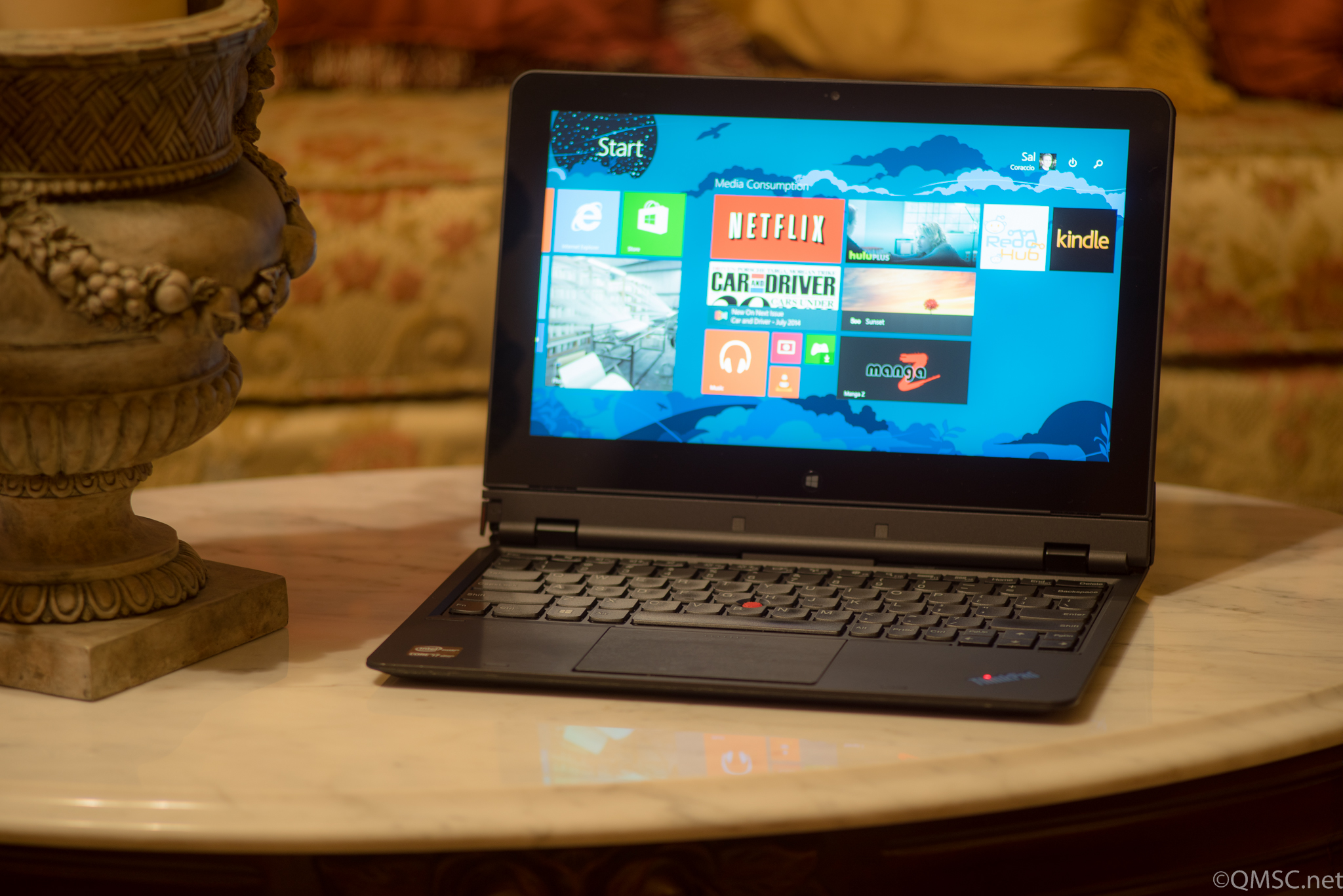
Lenovo ThinkPad Helix Convertible Tablet

First up for your consideration is the Lenovo Thinkpad Helix. Mine is configured as an i7 – they can be had as a slightly less powerful i5 (which most will find completely awesome), and the less expensive i3 is fine if you’re on a budget.

Storage and memory have various combinations as well. I’ve installed 12 gigs of RAM and there’s a 180GB Solid State Drive (SSD). Things run speedily and fairly quietly – occasionally the fans do kick in and the decibels creep up.

The coolest thing about this Windows 8 machine is it is also a tablet with a Digitizer Pen. The screen pops off and I can write on it just like papyrus! For my QMS work it is about as perfect a solution as possible.

What it means is that I can be on a manufacturing floor writing my audit notes; using checklists, referencing standards, taking images of evidence (when allowed), and searching for pertinent information on the internet.

The screen can also be attached facing away from the keyboard. That keyboard houses another battery, by the way, giving the whole rig about 8 hours total.

While I think the intent of that screen flip-ability was that it would be handy for a presentation to a small audience, I find it useful for watching movies on aeroplanes. Because the screen is on the near side of the traytable, it solves the problem of when the person in the row in front of you slams the seat back… I still really hate that person (don’t be that person!)

Other Tablet Options

Lenovo ThinkPad Yoga Tablet

While I do love the Helix, there is now the Lenovo ThinkPad S1 Yoga.

At first there was only the “regular” Yoga – it had touch, but it didn’t use a Digitizer Pen. This version, recently released – does. And it’s hugely important that whatever you get uses a Digitizer Pen – did I mention that? “Touch” does not equal “Digitizer Pen” – the pen has to come with whatever tablet you choose.

It is also an i7, has a larger SSD as well as a slightly larger screen. It doesn’t come apart like mine, but it folds in a way that is nearly as good (or better if you don’t like leaving half of your machine behind).

Battery life is about the same at 7-hours. And it’s a bit cheaper; couple hundred bucks cheaper, actually (don’t ask me what I paid for my Helix when it was new – the week it came out).

Downsides? It’s going to be slightly heavier – but 3.5 pounds isn’t terrible (the Helix is also 3.5 pounds, but it splits in two).

The Microsoft Surface(s)

So, there are now three MS Surfaces that will work quite well; the Surface 2 or Surface Pro 2, and the recently unveiled, Surface Pro 3.

The Surface Pro 2

I have a few colleagues that use the earlier Surfaces – and they do a fine job. I think, though, the one that will really do the task is the Surface Pro 3.

The price on the Surface 2 (not the Pro 2 or Pro 3) is well under $1,000 USD though it is running the lesser version of Windows. The Surface Pro 2 is pricier but also more capable for this task.

Surface Pro 3

The Surface Pro 3 has some pretty impressive specs, and the reviews have all been positive, but I haven’t tried one.

12 inch screen, 8GB RAM, 256GB SSD and a fast processor. And it’s light, under two pounds.

If you do go looking for a Surface , be aware that they don’t normally come with a keyboard/cover – and you’re going to need one.

The Surfaces are built like tanks and definitely have the horsepower. I personally find the screens of all but the Surface Pro 3 a bit small at just under 10 inches. This can be mostly compensated for, however, by adjusting the display settings.

Sony VAIO SVD13223CXB Slider Tablet

The jauntily-named Sony VAIO SVD13223CXB 13.3-Inch Convertible 2 in 1 Touchscreen Ultrabook is a solid and interesting looking machine. The hinge in particular is an engineering marvel as it allows the tablet to slide down and over the keyboard.

An Auditor Gadget Tablet
The Sony VAIO SVD13223CXB

A good-sized screen at a shade over 13 inches, though it is an i5 with somewhat lesser specs overall. I still like it and it will most likely do the job with very capable style as most Sony things do.

The price reflects the configuration, but it really isn’t that much less than the Yoga. It’s a bit on the heavy side, too, at 5 pounds. I wouldn’t get too hung up on even that weight as it cradles comfortably along the forearm.

It could be a great choice if you really love Sony gear (I kinda do since I have significantly more money invested in Sony-labeled things than in anything else).

ASUS Vivo Tab Note 8 Tablet

I thought I’d put this one out there – it’s a bit of a curve-ball. This ASUS Vivo Tab is an 8-inch Windows tablet – without a separate keyboard.  I really like as an option, particularly if you’re only occasionally going out onto a production floor.

An Auditor Gadget Tablet Option
The ASUS Vivo Tab Note 8

It’s quite inexpensive at about a grand less than any other option and the specs reflect that fact. It could easily be paired with a bluetooth keyboard.

Does it run Windows? Yes. Does it use a Digitizer Pen? Yep. Will it be a good tool for the Registrar Auditor? Eh, probably?

Is it as cool as Luke’s mechanical hand and do I want one anyway? Definitely yes (but i’m not giving up my Nexus 7 Tablet).

What Else?

A few of you may be asking, “What about an iPad?”

  • No real digitizer pen – showstopper
  • While it does touch, and has a pointer, it lacks resolution for small writing (yes, I’ve seen it do large pretty signatures in restaurants).
  • No easy way to collect notes – Microsoft OneNote on a Windows tablet is perfect for this. Yes –  there is a OneNote IOS App but it is crippled. “But there’s this cool note-taking app that works with a finger or this nifty pointer!” – No. It forces you to make bite-sized snippets of notes that have to be resized and task-switched and meanwhile you wake up and you’ve grown a long beard and everyone you know has moved on. A long beard made of papyrus.

The iPad is a nice, sexy device – I want one just to look at it and hold it… BUT IT CAN’T DO THIS TASK.

Let me be clear, I have colleagues that love them some iPad, because it does so many things so well – and they are gadget freaks too – but even they can’t make the thing do what it needs to do.

The main problem isn’t the pen/pointer, or the lack of one – it’s a limitation of the screen. Hard to work around that.

Maybe someone could ease the pain with software; a nice app that bypasses the need for detailed writing. A logical collection of related standard selections. But why?? It just isn’t worth the trouble.

Note-taking on a Windows tablet with OneNote – it just works.

Keep your iPad for everything else if you’re a fan, but get a Windows-based tablet with a Digitizer Pen for doing audits.

QMSC’s Top Pick

Because of the flexible form factor and no-compromise workability I have to go with the Lenovo ThinkPad Helix.

It looks perfect on paper and since I’ve used it for over a year I know firsthand how rugged and powerful it is.

The Yoga is probably my second choice, but I’d like to see what the Surface Pro 3’s are all about (I’m a bit afraid they will be the best solution out there but be too pricey for it).

And, I’m kind of feeling like there’s room in my world for an 8 inch Windows Tablet like the Asus Vivo. Nokia makes a similar machine (Nokia Lumia 2520) but it lacks a pen and requires a cell plan.

There you go – the Helix plus a few other good options for an Auditor-friendly tablet computer that will make the Gadget Geek inside you say, “Thank you, kind sir, that was a reasonable list of solutions that I find technically and aesthetically satisfying.” (Gadget Geek is kind of nerdy sometimes).

Do you have a gadget you’re in love with? Post it and share the wealth! There’s always room for more stuff!

Thanks again – and if you do decide to buy something I’ve reviewed here, please do use the links supplied as it will help the site stay around.